Monday, 21 January 2013

2d Lesson 12 - Insectoid Brief

Character Description:

An insectoid/human hybrid from a far off solar-system. Eons of evolution and DNA splicing has bred a distinctive species of mammals that have developed the extra appendages and wings of their bug-like ancestors. However due to the diluted human breeding over time the species had lost their ability to develop and grow their natural exoskeleton as well as many infants being born spineless. To compensate an exoskeleton is fused to the individual's body at birth, providing them the protection they need to survive the harsh, dry and irradiated terrain of their home world, whilst allowing them to move with their invertebrate skeleton.


Research and References:

Insect main features:
  • Six legs.
  • Segmented bodies.
  • Supported with a carapace exoskeleton made from chitin.
  • Usually have two wings, but can have four or even none.
  • Insects are invertebrates.
Honeypot Ants develop large abdomens that store honey, which they can then use for food and energy. The honey can be seen glowing in their abdomen.


The exoskeleton is generally divided into sub sections to allow movement of the different muscles. 


Chitin is acts like armour on an insect, protecting it's small frame.


Most insects possess exterior mandibles on their exo-skeleton, to aid them in digging or tearing up food.


Some insects such as spiders possess shiny, reflective black eyes - closer to a mammal.


Concept:

Initially I started off with some rough sketches - I set out with an idea of creating a humanoid/insect hybrid, but I wanted to avoid the cliches of an insect head on a human body. Instead I was hoping to try and find a way to morph a human into possessing distinctly insect features - whilst still holding onto human qualities - such as a face and humanoid figure.


 I settled on the idea of the third sketch as I felt it possessed the more humane side of a character, but you could still see the insect's origins from first glance. Still I wanted to use the carapace design and mandibles from the second and first sketches to flesh out the character's insect origins a bit more.


I added some additions of a honeypot power source, as used by ants - I thought this would be a decent way to give a sci-fi edge to the character, as well as it giving him a plausible explanation for insect based weaponry. I'm fairly happy with how the design came out - as a character I feel he could work well as a companion in a game, or perhaps an enemy in a shooter. If I had more time I think I would of attempted to work a more unique design onto his head - but as it stands I am fairly happy with the result.

Wednesday, 16 January 2013

3d Lesson 14 - Frog Animation


In this last 3ds Max session, I had to rig the model of the frog I pelt mapped, using the default biped.

First I did was to flip the frog into an upright position, so that I could better line up the biped.


Once done I had to move the individual bones of the biped into the frog's corresponding limbs and body structure. It wasn't too difficult - the most tedious part was lining up the extra horse-link join in the leg. When the parts were lined up I used the skin modify to weigh the bones - I edited the envelope's vertices to make sure the model deformed properly according to the skeleton.


When I was satisfied with the weighting, all that was left, was to animate the skeleton using the key frames tool and make my animation.


I was very happy with how the rigging came out on this model - I felt the weighing was fairly accurate, and although there were some parts of the model that deformed a little incorrectly, this was due to the model itself rather than the weighing I think.


Tuesday, 15 January 2013

2d Lesson 12 - Tonal Speed paint

 
Today we had to do two one hour speed paintings. The first was a black and white image of a small boy - I'm happy with how the design came out, but I definitely could of worked the tones to be more extreme.


I'm happy with how the image itself came out for this particular painting, but I definitely could of made the difference between the tones more obvious and contrasting, but I think the colour matching went well at least.

Sunday, 13 January 2013

3d Lesson 13 - Pelting and Animation


Following on from the previous lesson we were looking at further adding the biped to a model of our own.


We were supplied with a model of a woman in a green - jacket and were tasked with retexturing her to her to a design of our own.


I decided to go for a survival/action hero look, with ripped jeans and bloody attire, I used textures of jackets and denim to create the outfit, then painted the stains over the top. I found the model very easy to texture - but no matter how much I edited the face, unfortunately it was still stuck with the same low detailed structure.


Once fully textured I had to insert the biped into the model, lining up the body parts to the biped like I did with the skeleton in the previous lesson. I found it easier to do than before, mainly due to teh fact the female model matched the biped's figure fairly well.


Once lined up, I added a skin modify to the model and used the biped's bones as the skeleton. I then had to edit the envelopes and vertices to control the strength of certain bones over the model's frame. I found it a very tedious task, and I did not finish it perfectly - however I understand how the process works now, and I find it simple to use - if just a one that requires alot of patience to fine tune the vertices.

I created a small animation to test the weighting on the model, and see what body parts tear and clip. I think it came out ok, there isn't any major deformation and the model remains somewhat in proportion, obviously I could of fine tuned it further, but I ran out of patience at the time - what with 3ds max glitching out half the time.


To round up the skinning side of the project, I was given a model of frog to unwrap it's uvs and texture.

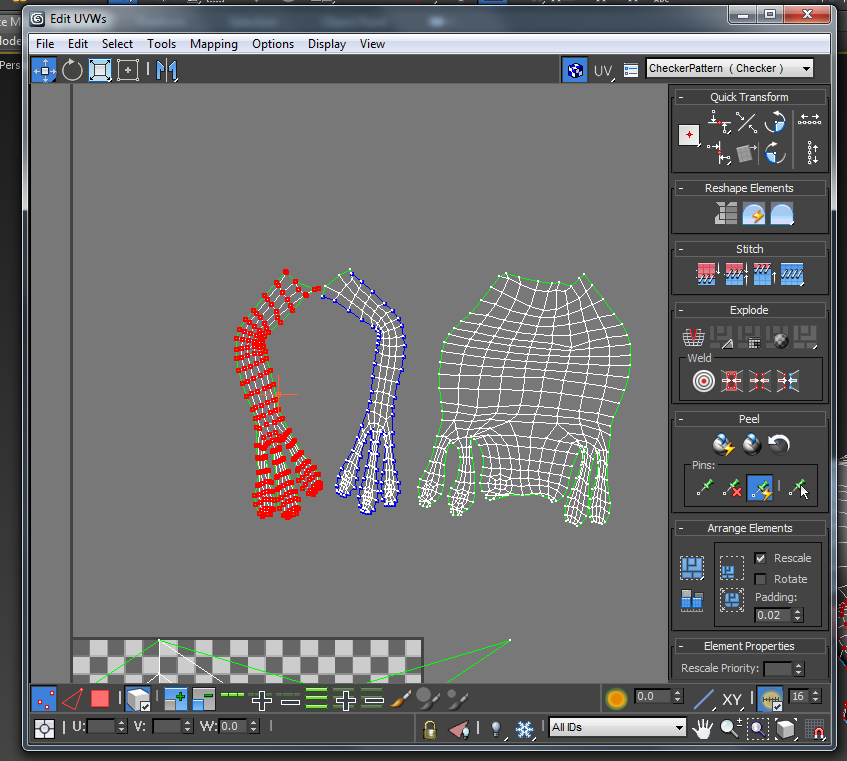
 Following a tutorial I applied a UVW map to the model, and used the pelt tool to cut seams around the limbs and head.


Splitting the uvs apart like this means I could create a easy to read and well laid out uvw map, for me to texture It was simple enough to do, the tutorial explained it well, but it was a long process, but I can see the accuracy of the maps and how they reflect onto the model. Eventually I was left with a full map, constructed from the pelted model.


Using photoshop and a tablet, I painted the model's basic colour scheme before, adding frog texture, and a shiny overlay. The uv map wasn't perfect, but it didn't pinch too much and it was easy enough to texture with minimal stretching.


I'm quite happy with what I learnt using the pelt tool, I found laying out a uv map to orignally be a daunting task but after doing this exercise it's really quite simple, just will take further practice which I intend to use.


3d Lesson 12 - Biped Animation


This week I had to experiment with the Biped tool in 3ds max - which is used to create animations and rig/apply them to a character model. I found the tool to be very useful and I understand it will be crucial component to creating characters in a video game.


To begin with I generated the standard biped model and then messed with the proportions to better understand how the system worked. When I was done, I loaded up a supplied animation file and watched how it animated my biped.


 The next task was to edit some of the existing movement animation which I did, altering one of the current walk files animation using the layer tool - so I kept the same movement, but added alterations to it. In this case I did a sword and shield - it's very rough, but I found it a good way to start learning.


Another feature I tried out was the flex filter - which added a sort of jiggle based phsyic to an oject. I found this a fun to use to create a nose for the biped - but it would be better overall to use bones to animate.


Finally we tried animating a pre-made model using the biped in this case a skeleton.


In this case it was a task of lining up the biped skeleton with the skeleton model, then attatching each of the model's bones to the biped's. I had trouble with the fingers, but decided to leave them - as it would take too much work to break them apart. Overall I found this exercise a good introduction to animating and the biped tool, and I hope to expand my use of it and refine my animations and movements.


Tuesday, 11 December 2012

Sketchbook 11 - Character Design and Toys


First sketch was of a toy helicopter I used to play with as a kid, I wanted to go for a vehicle design, and my aim was to try and achieve perspective with as little guidelines as possible, I think it was a fairly successful attempt as a sketch, but I did have some trouble with the wheels.


 Here I sketched two character designs, the first a warrior woman of sorts, I still need alot of practice with female characters, but I'm ok with how this came out, I think the proportions fitted well, but I wasn't too pleased with the face at all, although the scan of the image takes away alot of the shading.

The next character was a alien/creature design, really rough but I fele it has quite a bit of character, I like the overal design, but once again the shading disappearing on the scan has annoyed me a bit.


 Here was a sketch of a Luke Skywalker figurine, not pleased with this one at all, admittedly I was tired when I did it, I don't like how the head came out at all, then again the model's face was somewhat melted. I think the body isn't too bad, but I could of done better overall.

Wednesday, 5 December 2012

Life Drawing 6 - Female Model

This week we had a female model posing. As with the male model, we had to draw her in different poses at different durations. The first image directly below was done with a single-line however, in order to just draw the silhouettte, had difficulty with this technique as I was tempted to simply draw all the features in, still it came out ok despite how difficult I found the task - especially in mapping the anatomy.


I was fairly happy with how my longer skecthes came out. I avoided drawing the face and mainly concentrated on the main proportions of the body, I was pleased with the results, I've learnt alot with these classes and I feel it's shown. I think the only real difficulty I had was with the legs and thigh, getting them at the right angle was difficult due to the perspective of the pose.


Tuesday, 4 December 2012

Sketchbook 10 - Broken Dragon and Monkey Man


 I found an old dragon toy I owned, however it was missing a few parts, but I decided to sketch it anyway as it made for an interesting design. I feel like my line work is getting stronger and I am happy with the piece, I fill the form came out strongly.


Here I drew a monkey man character hanging from a branch or pipe, I played with proportions on a bit for this one, but I like the overall composition and design. I'm also pleased with the shading as it is subtle but makes it stand out.

2d Lesson 11 - Harmonising and Speed painting


The first thing we had to do was a speed painting in an hour, based off a reference. I think the foregrount figure of the boy on the left came out well, but I had difficulty in doing the background, or at least getting it more realistic, but I did find an interesting technique when it came to making it less obstrusive, by using a grey fill on a opaque layer to flatten it down.


The second exercise was another speed painting done in 50 minutes. I had a bit more difficulty with this one due to the fact my monitor at the time's colour wasn't accurate so the image came out alot lighter than I expected. I like how the came out, however I feel I failed in regards to the composistion off the image (which was more at an angle) and I used too much yellow where I should of used blue. Still in future these mistakes will be the first things I focus on foremost.


Lastly is a painting I did using a limited colour swatch from a previous image - that consisted of mainly yellows, pinks, and muted purples. I'm in a mixed mindset with how this came out, I like the creature design, but I had difficulty painting within the limited colour scheme, but I feel it was able to achieve the exercise's goal.


Monday, 3 December 2012

3d Lesson 11 - Unwrap Model

This week I had to texture a pre-made model that hadn't been UV Unwrapped.


Using the UVW Unwrap tool, much like the same way I did for the t-shirt model. I had to find the seams in the model in order to texture it, I also used the relax tool to expand the map and pixels to prevent stretching.


I really disliked the model as it had terrible clipping and the textures poked through with rough edges. The eyes also bulged out and I couldn't fix it in the render. Still as an exercise I am satisfied with the texturing, there was a few stretching incidents, but it otherwise came out well.


Finally I did a quick exercise to produce a texture from a photo using Photoshop.


Using the grid overlay view and transform tool in photoshop, I was able to take a part of the bulding and skew it so that it was flat and not at an angle. I've done this before but I never thought to use the grid overlay before, and it was incredibly helpful, I'll definitely not overlook it in the future as it speeds up the process and makes the texture more accurate.


Then all I had to do was place the texture onto a box, and preserve the uvs so I can extrude the windows into the building.

This was a quick method to produce textures for buildings but I found it helpful and can see it coming in handy for creating low poly assests.

Games Encounters 3 - Atmosphere